

Logo

What are you looking for?

Get help straight from our team...

Wise Agent Mobile Web App For iPhone

General Questions

Wise Agent Mobile Web App For iPhone

Our Wise Agent mobile app has all the main features from the desktop version for a convenient and fast mobile web app. You will be able to have immediate access to every aspect of your business right from your phone. By using the app you are able to connect with your clients even when you are not in the office or in front of a desktop computer.

Last updated on 04 Dec, 2024

  1. Launch Safari on your ‌iPhone‌ or ‌iPad‌.

  2. Navigate to www.wiseagent.com

  3. On the top right corner click on Login, then enter your Wise Agent login and password. 

  4. Tap the Share icon (the square with an arrow pointing out of it) at the bottom of the screen.

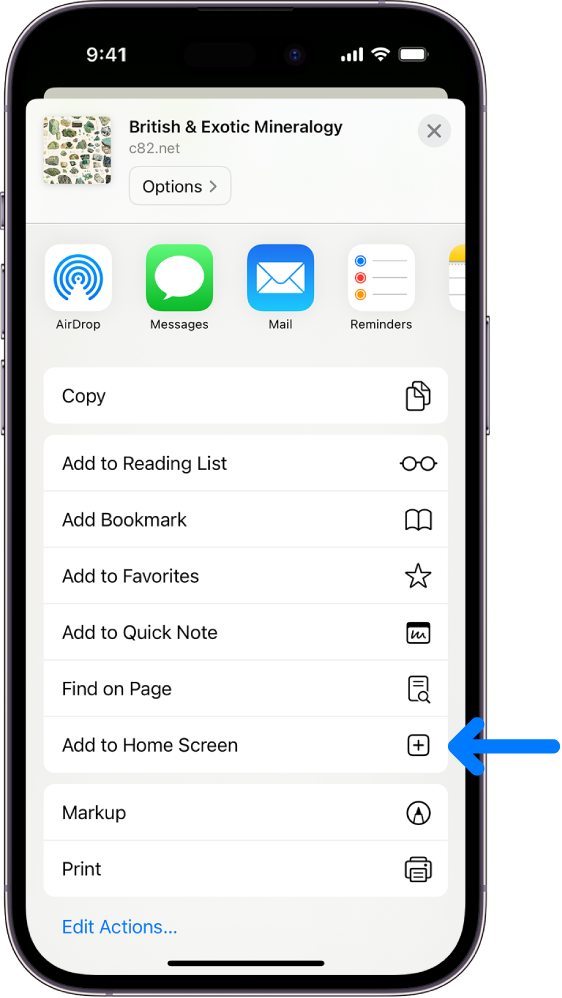
  5. Scroll down to the list of actions and tap Add to Home Screen.

  6. (If you don't see the action, scroll to the bottom and tap Edit Actions, then tap Add next to the Add to Home Screen action. After that, you'll be able to select it from the Share Sheet.)

      Now, you can click on your app anytime to use Wise Agent on the go! 
Image
Did you find this article helpful?
Previous

Wise Agent's Support & Training Resources

Next