

To create a CSV file containing only your contacts' names and addresses:
1. Click "Contacts", then "Contact List."
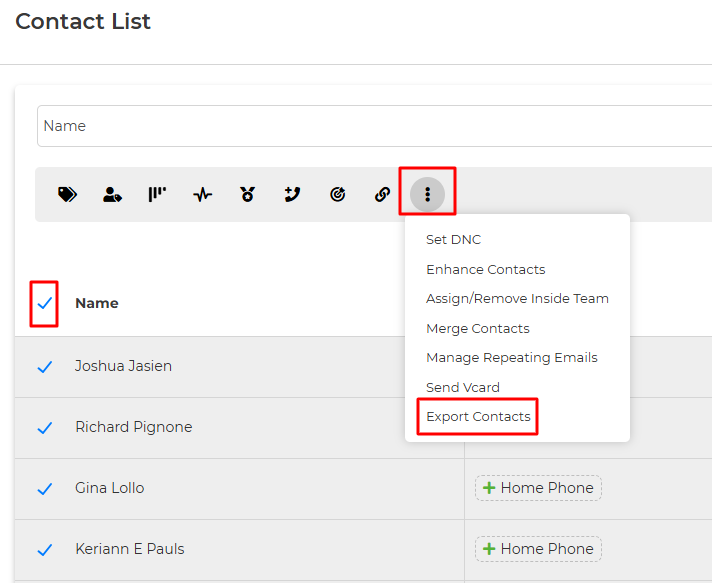
If you'd like to export all contacts, select the empty box next to Name. If you have specific contacts you'd like to export, you can filter your list by selecting "Filters" first.
Once the contacts are selected, the bulk actions box will appear at the top of the screen.
Click the three vertical dots, and select "Export Contacts"
From here, you can select the fields you'd like to include, such as Name & Address information.
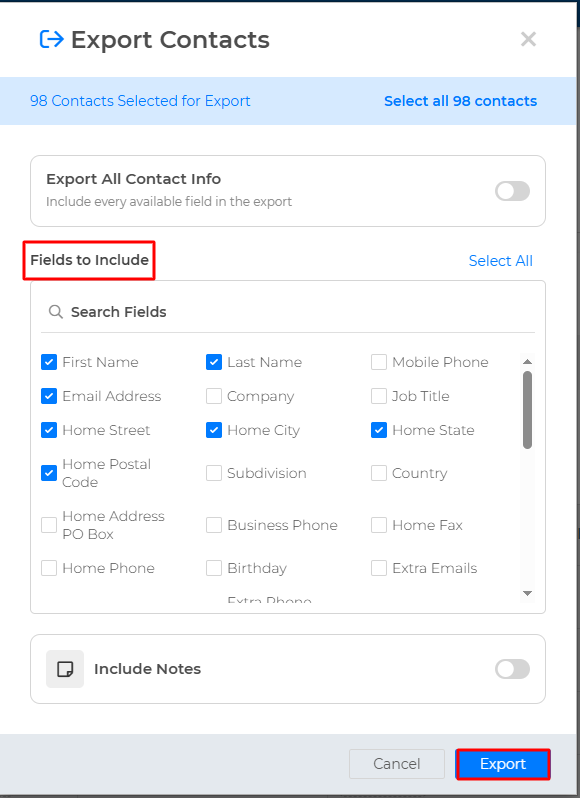
Then click the blue "Export" button to start the export! You will see a prompt to stay on the page until the export finishes. Once the export completes, you will see a Recent Exports box on the right side of the page. You can hover over the Exports to see the time they were completed, or click the export to download to your computer.