


If you would like to send your iHOUSEweb leads to your Wise Agent CRM you can do so by using the Wise Agent Lead Capture Email Address. Once your setup is complete your iHOUSEweb leads will automatically forward to your Wise Agent account. To set up Email Parsing from iHOUSEweb to Wise Agent, follow the steps below:
In Wise Agent:
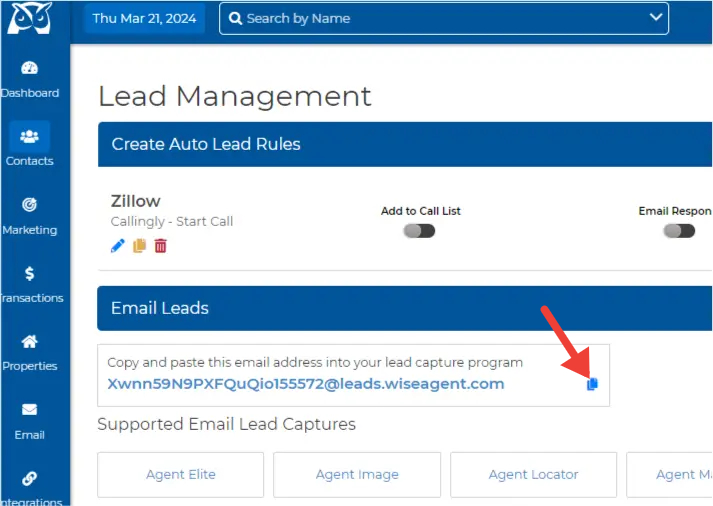
Login to your Wise Agent CRM and click Contacts then click Lead Rules.
Click the copy icon next to your Lead Capture email address.
In iHOUSEweb:
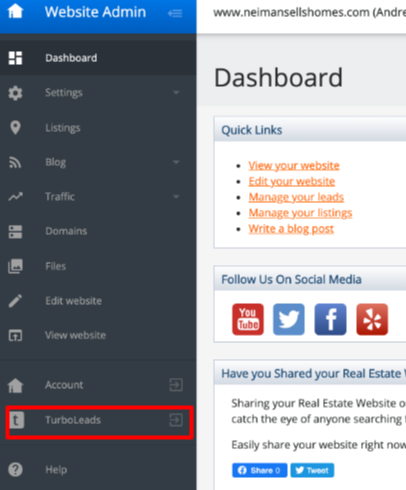
Login to your iHOUSEweb account by visiting your personal IDX search website, scrolling down and clicking Admin Menu.

Click on the TurboLeads option to access your TurboLeads CRM.
Click on the Settings option and scroll down to the section labeled Notifications.
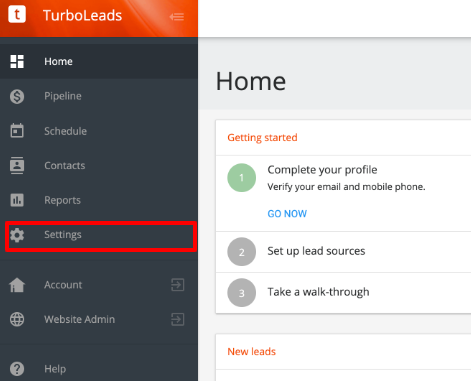
Scroll down to the Notifications section and locate the Additional Notification Email Addresses section, paste your Wise Agent Lead Capture Email Address, and click on the Save Settings option.
If you're unable to complete the instructions above please contact our support by clicking on the Contact Us button or call our office at 480-836-0345. Our amazing support is always happy to help and is available 24/7!
You can contact iHOUSEweb support by phone at 1(866)645-7700 or by email support@ihouseweb.com.
Now that you've set up lead forwarding from iHOUSEweb to Wise Agent don't forget to set up your Automated Lead Rules.
Click here for a step-by-step video tutorial or visit our help article for instructions on how to set up your Lead Rules in Wise Agent.