

Email Performance
You will want to go to your Send Email tab on the left hand side of you Wise Agent account.

Once on your Send Email Page, find "Email Stats" on the right hand top corner.
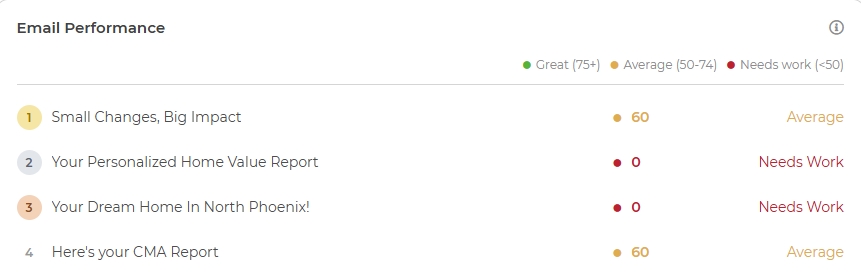
On the middle right hand side you will see information that is titled "Email Performance."
How Email Performance Scores Are Calculated
Every time you send out an email, Wise Agent grades it with a Performance Score from 0–100, so you can see how it performed relative to industry expectations, not just how many people opened it.
Performance Ratings
Score | Rating |
75–100 | Great |
50–74 | Average |
0–49 | Needs Work |
Score Breakdown
The score has two components that add up to 100 points:
Component | Weight | Full Points | Benchmark |
Open Rate | 60% | 60 pts | 25% open rate = full points |
Click Rate | 40% | 40 pts | 3.5% click rate = full points |
Points scale linearly from 0 up to the benchmark, then cap. Exceeding the benchmark doesn't add extra points. A 50% open rate scores the same as a 25% open rate.
Penalties
Points are deducted for signals that hurt your sender reputation. Each penalty scales linearly between its starting point and its "full penalty" threshold:
Issue | Max Deduction | Full Penalty At |
High Unsubscribes | −25 pts | 0.5% unsubscribe rate |
High Complaints | −25 pts | 0.2% complaint rate |
Low Delivery Rate | −35 pts | 80% delivery rate (penalty starts below 97%) |
Penalties are proportional. A 0.1% complaint rate deducts about 12 pts, not the full 25.
The final score is floored at 0 and capped at 100.
Example
An email sent to 400 contacts:
38% open rate (above the 25% benchmark): full 60 open points
2.1% click rate: 60% of the 40 click points, so 24
0.15% unsubscribe rate: -7.5
0.05% complaint rate: -6
99% delivery rate (above the 97% threshold): no penalty
Score: 70, Average
Date Range/New Email
There is also a space for you to change the date range to so you can see the stats for specifics dates. You will find where to do this on the time right hand corner. You can also create a New Email from this page as well.
Tips to Improve Your Score
Opens: Subject line is everything. Personalization, curiosity, and brevity all help.
Clicks: Every email should have at least one clear call-to-action link.
Unsubscribes: Segment your list. Sending to engaged contacts keeps this low.
Complaints: Never send to people who didn't opt in. Clean your list regularly.
Delivery: High bounce rates drag your delivery rate down. Remove invalid emails.
A Note on the Top Performers List
The Top Performers list ranks emails using a volume-adjusted version of the score, not the raw score. A single send with a perfect score isn't ranked as reliable as the same score earned across hundreds of sends. The adjustment scales up toward the full score as your send volume grows, using 250 sends as the reference point. Your displayed Performance Score and rating are never affected by this. It's only used to decide ranking order on the Top Performers list.
We hope this information was helpful! Please reach out to Customer support with any further questions!