

Logo

What are you looking for?

Get help straight from our team...

Settings

Lead Tracker

The Lead Tracker is used for Outside Teams. This feature allows you to track the progress on all of the leads you have sent out and the leads that have been given to you. Whether you're the sending or accepting agent - you can view the lead status, date started, and last follow-up date.

Last updated on 21 Nov, 2022

To locate the Leads Tracker page follow the steps below

1. Click the settings Gear to the top right from the drop-down and select "Outside Team"

2. Click on the Lead Tracker tab

Image


Here you can see what leads have been shared, the accepting agent, the status (the status shows whether or not the lead has been accepted, declined, assigned, or deleted), the date sent, and the last update on the lead.

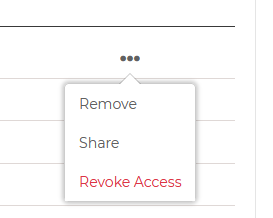
Clicking on the ellipses will give the option to remove, share, or revoke access of the lead.
Image
Did you find this article helpful?
Previous

Setting up Permissions

Next